Originally posted to r/tonalgym on Reddit.
Hey folks, I started a project to provide a completely custom controller for
the Tonal 1. This replaces the Android tablet and directly talks to the motor
controller using the internal USB serial connection.
This is super barebones and not well tested, so you’re on your own if it bricks
your system. I figured I should publish it and see if folks were interested in
contributing things such as workouts, programs, etc. The standard Tonal
subscription is good enough for me, so I’m not sure how much I’ll actually push
on this.
Originally published on the PyTorch Developer Log.
TL;DR - Python can drive GPUDirect RDMA at line rate without a large
transfer-engine abstraction. rdma4py provides lightweight, backend-specific
bindings for ibverbs, AWS EFA, and NVMe-oF, reaching about 400 gbps in our
benchmarks while preserving direct access to the underlying APIs.
Introduction
Recently, quite a few different “transfer engines” have been developed for fast
weight synchronization between machines using RDMA-capable transports and
libraries such as NVLink, ibverbs, EFA, NVMe-oF, and SPDK. These include projects
such as Mooncake,
NIXL, and
Uniflow.
As with any large project and abstraction, these projects make trade-offs around
specific use cases that might not be optimal for yours.
Originally published on the PyTorch Developer Log.
TL;DR – Modifying the C++ comms layer is a big barrier when researchers want to prototype new collective features. We’ve added Python bindings to torchcomms (#2080) and built two pure-Python backend prototypes — one wrapping NVIDIA’s new nccl4py bindings (#2515) and one built on SymmetricMemory + Triton (#2521) — both passing the core torchcomms integration test suite. Since they plug into torch.distributed, researchers can fork, tweak, and mix them with existing projects like TorchTitan without touching C++.
Originally published on the PyTorch Blog.
Introduction
Torchcomms is a new experimental, lightweight communication API intended for use with PyTorch Distributed (PTD). In addition to the core API, we are open-sourcing NCCLX, a new backend we developed to scale to over 100,000 GPUs.
With our first release of torchcomms, we’re delivering the foundational APIs and backends required for large-scale model training in PyTorch. This initial release focuses on core communication primitives that enable reliable and performant distributed training at scale. Over the next year, we’ll continue to mature the offering—introducing features that make it easier to prototype new collectives, scale seamlessly with built-in fault tolerance, and optimize device-centric communication patterns. Our roadmap is focused on empowering researchers and developers to move faster, test new ideas at scale, and build the next generation of large-scale AI systems.
Originally published on the PyTorch Blog.
Collaborators: Less Wright, Howard Huang, Chien-Chin Huang, Crusoe: Martin Cala, Ethan Petersen
tl;dr: we used torchft and torchtitan to train a model in a real-world environment with extreme synthetic failure rates to prove reliability and correctness of fault tolerant training
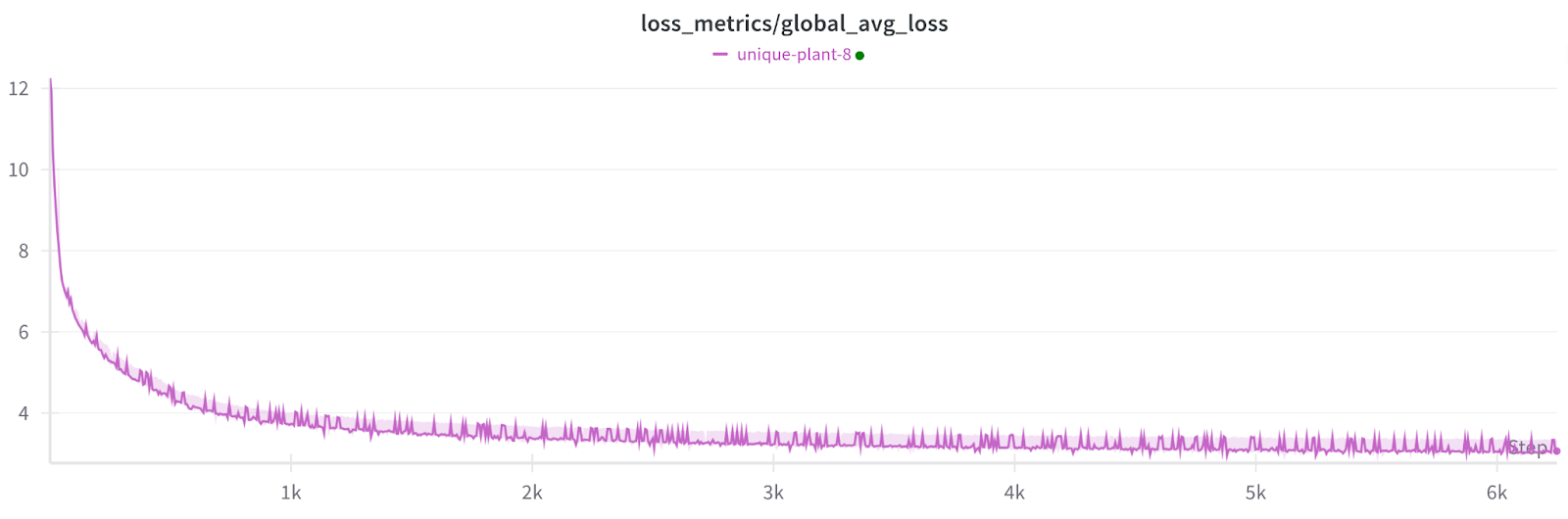
Training loss across 1200 failures with no checkpoints.
NOTE: Each small spike is a non-participating worker recovering which affects the metrics but not the model
Introduction
We want to demonstrate torchft in worst case scenarios by running a training job with the most extreme failure rates possible.
Over the past 9 months, I’ve been rewriting my models from the ground up and
open sourcing them on GitHub. The code is now fully public and available for
anyone to use and modify.
The majority of the code is a
BSD-3-Clause license
which matches other open source projects such as PyTorch. There are a few pieces
with modules borrowed from other projects.
This is a follow up to
3D Dynamic Objects
and is part of a series where I try to train models to perform common self
driving tasks from scratch.
This is a follow up to
3D Semantic Segmentation
and is part of a series where I try to train models to perform common self
driving tasks from scratch.
I decided to switch areas of focus for this new model. Previously I had been
working entirely with dense models which output dense representations about the
world such as the voxel occupancy grids and the BEV semantic maps for lane lines
and drivable space.
This is a follow up to
Voxel from Multicam
and is part of a series where I try to train models to perform common self
driving tasks from scratch.
I’ve previously put together occupancy models for self driving but that’s only
one specific perception task.
Another common driving task is semantic segmentation. Semantic segmentation
takes in the image and for every pixel predicts a specific class. This can be
used to tell things like walls apart from cars or classify different types of
lane lines and curbs on a road.
This is a follow up to
Monocular Depth Improvements
and is part of a series where I try to train models to perform common self
driving tasks from scratch.
Background
I spent a couple of months optimizing single camera (monocular) depth models before
realizing that maybe there’s a better way. One of the biggest improvements I
made to the monocular models was adding a 3D geometric constraint to enforce
that the model didn’t predict depths below the ground.
This is a follow up to DIY Self Driving.
In the past few months I’ve been iterating on my previous work on creating self
driving models. The main goals were initially:
- train depth models for each camera
- generate joint point clouds from the multiple cameras
- use the fused outputs to create a high quality reconstruction that I can use
to label things like lane lines
This post lists all the various problems I ran into and some of the mitigations
I applied for those issues.
This work was done in collaboration with green, Sherman and Sid.
During the holidays I decided to take some time and try to make my own self driving machine learning models as part of a pipe dream to have an open source self driving car. I hacked this together over the course of about 2 weeks in between holiday activities.
Disclaimer 1: I’m a software engineer on PyTorch but this work was done on my own time and not part of my normal duties.
This is a follow up to Hacking my Tesla Model 3 - Internal API.
As part of reverse engineering the Tesla Model 3 internals, I’ve been running a
subset of the CID car services to see how they work.
The car computers are using Intel Atom based processors so it’s easy to setup a
chroot to launch the services.
I’ve written two helper scripts to set up the car environment:
- chroot.sh - runs a command in the Tesla
chroot environment.
- start_car.sh - runs the main vehicle
services: escalator, ecall_client, sim_service, carserver,
vehicle.
Other services can be launched via
./chroot.sh /usr/tesla/UI/RunQtCar <service>
These scripts assume a CID image is extracted at squashfs-root/.
This is a follow up to Hacking my Tesla Model 3 - Security Overview.
This is a technical description of all the internal services I’ve found and
notes about how they work.
All of these services described are normally unaccessible due to seceth and
firewall rules.
Hosts
192.168.90.100 cid ice
192.168.90.100 ic
192.168.90.102 gw
192.168.90.103 ap ape
192.168.90.104 lb
192.168.90.105 ap-b ape-b
192.168.90.30 tuner
192.168.90.60 modem
Tuner isn’t present on newer Model 3s as the AM/FM radio has been removed. I’m
not sure what lb is.
See the follow up at Hacking my Tesla Model 3 - Internal API.
I recently got a Tesla Model 3 and since I’m a huge nerd I’ve been spending a
lot of time poking at the systems and trying to reverse engineer/figure out how
to root my car.
I work on Machine Learning infrastructure so I’d love to be able to take a deep
look at how autopilot/FSD works under the hood and what it can actually do
beyond what limited information the UI shows. I know some people have managed to
get a copy of this.
Edit 2018-09-20T15:42-07:00: Dropbike’s response to these issues
Edit 2018-09-19T19:38-07:00: Updated support comments to more accurately
reflect their response.
Note: These issues were responsible disclosed and have since been fixed. This
is my understanding of the issues to the best of my knowledge.
To give you a little bit of background, Dropbike is
a new bike sharing service that just launched at the University of British
Columbia as one of their first locations. They’re only about a year old and
based out of Toronto. The service is pretty simple, they have a bunch of bikes
with a cell connection and bluetooth low energy locks spread out all over
campus. You can use their app to find nearby bikes and unlock them. Overall, it
seems like a neat convenient service and I was super excited to have them on
campus.
